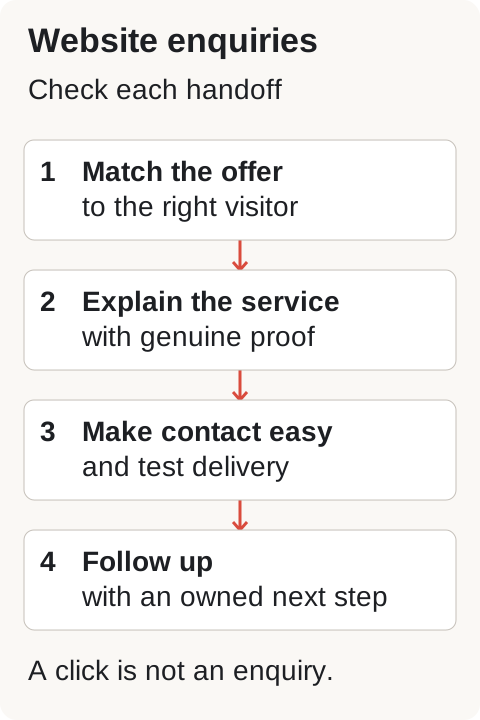

A visitor count tells you that people reached your website. It does not tell you whether they needed your service, understood your offer or could contact you. For a Qatar service business, those are three different problems with different fixes.
Before buying more traffic, trace the path from the page a customer first sees to the person who answers their enquiry.
Check that the visitors match the service
Review the pages people enter, the sources that send them and the enquiries you actually receive. Use your available analytics and Search Console data; if measurement is missing, record that gap rather than guessing.
Separate service demand from other visits. Someone reading a general advice article may be researching, while someone searching for a specific service in Doha may be ready to compare suppliers. Staff visits and irrelevant campaign clicks should not become evidence of customer demand.
Ask which service, location and customer type each landing page serves. If a campaign promises commercial maintenance but sends visitors to a generic homepage, create a clearer route to the relevant service before changing the whole site.
Make the offer easy to understand
Open the landing page on a phone and read the first visible text. Can a new customer tell what you do, where you work and what happens next?
An illustrative example: a fit-out business could replace a vague headline such as “Spaces that inspire” with a factual description of its commercial fit-out service in Doha. The next section could explain project types, what is included and what information is needed to discuss a project. This is an example of clearer wording, not a claim about a client or a result.
Keep important details on the service page. Customers should not have to assemble the offer from a gallery, an About page and social posts. Explain genuine constraints too: service areas, project suitability and any information needed before a quote.
Show evidence that helps a customer choose
Use approved photographs of real work, accurate credentials and examples you have permission to share. Explain the work shown and your role in it. A stock photograph can support presentation, but it cannot prove a completed project.
If you do not yet have publishable case studies, give a clear account of the process, responsibilities and deliverables. Avoid filling the gap with invented testimonials or vague claims of expertise.
Test the entire enquiry path
Follow each contact route on a phone and a desktop:
- Does the form submit successfully and show an accurate confirmation?
- Does the enquiry reach the intended recipient, including any spam folder?
- Do phone and WhatsApp links reach the correct business account?
- Is someone responsible for replying and recording the next step?
- Does the form ask only for information needed to start the discussion?
Use a clearly identified internal test and remove it from lead reporting. A button click is not proof that an enquiry was received. A submitted form is not proof that a customer was contacted.
Fix one evidenced problem, then compare
Keep a simple record of relevant visits, received enquiries, qualified enquiries and next steps. Note when the page or campaign changed. Compare similar periods and account for changes in the traffic source; a small sample can fluctuate without proving that a design change worked.
Start with failures that block contact, then unclear information or missing proof. If qualified enquiries arrive but quotes stall, the next repair may belong in sales follow-up rather than web design.
Beyond Line connects the website to the business offer and enquiry process. Explore our Websites & e-commerce service and discuss your website requirements. Bring the page URL, the service you want to sell and any evidence of where customers stop.
For an initial technical screen, the Website Audit Beta reviews one public webpage and reports available checks and limitations. It does not review the whole website or replace a human assessment of your offer, customer behaviour or sales process.